
How Open VTS Works: Platform Hierarchy, Roles, and Workflow
Understand why Open VTS uses Superadmin, Admin, and User roles, what every major module is designed to do, and how accounts, vehicles, devices, maps, notifications, payments, and platform settings work together.
Last updated August 17, 2026
How Open VTS Works: Platform Hierarchy, Roles, and Workflow
Open VTS is designed to manage both sides of a GPS tracking operation:
- The technical platform that receives and processes GPS data
- The business operation that manages customers, vehicles, devices, drivers, payments, and support
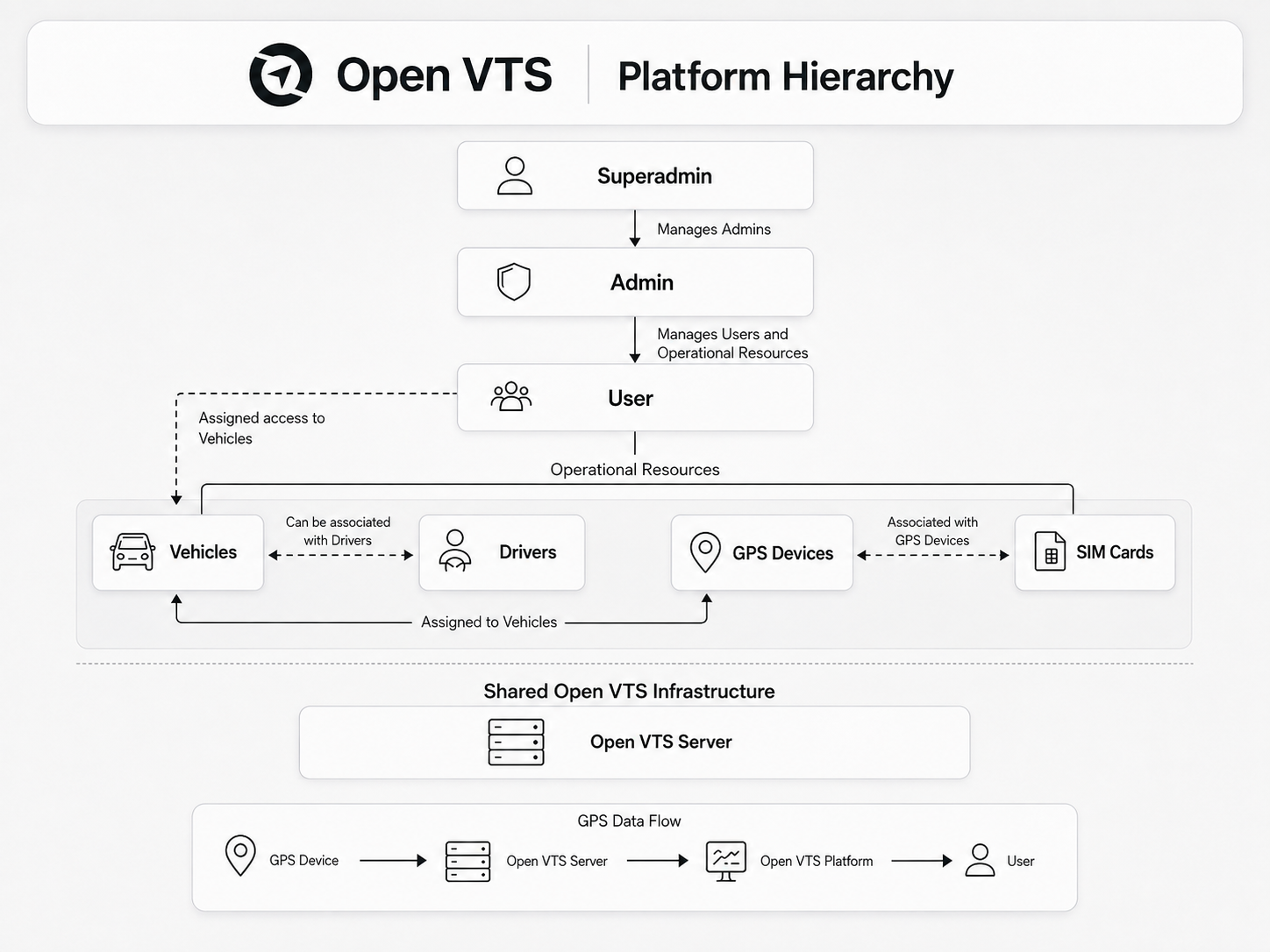
To keep these responsibilities secure and organized, Open VTS uses three primary roles:
- Superadmin
- Admin
- User
Each role has a different purpose.
- The Superadmin controls the complete Open VTS platform.
- The Admin runs a GPS tracking business or fleet operation inside the platform.
- The User tracks and manages the vehicles assigned to their account.
This page explains why every major module exists, how the roles are connected, and what must happen before live tracking can work.
The individual Superadmin, Admin, and User guides will later explain how to use each module step by step.
Why Open VTS Uses a Hierarchy
A GPS tracking platform may serve many businesses, customers, vehicles, drivers, and devices.
Without a hierarchy:
- One customer might see another customer’s vehicles.
- Business settings could affect the entire platform.
- Payments and renewals could become mixed.
- Support and activity records would be difficult to trace.
- Users might receive permissions they do not need.
- Platform administration and daily fleet operations would overlap.
The Open VTS hierarchy separates responsibilities.
| Role | Main responsibility |
|---|---|
| Superadmin | Operates and controls the complete platform |
| Admin | Manages a business, reseller operation, branch, or customer group |
| User | Uses assigned fleet resources for daily operations |
This separation provides:
- Data isolation
- Clear ownership
- Role-based access
- Better security
- Easier business management
- Operational accountability
- Support for multiple customers and fleets
The Complete Open VTS Relationship
The main business relationship is:
Superadmin
↓
Admin
↓
User
↓
Vehicles
↓
GPS Devices and SIM Cards
A more complete relationship looks like this:
Open VTS Platform
↓
Superadmin
↓
Administrators
↓
Users, Team Members and Drivers
↓
Vehicles
↓
GPS Devices and SIM Cards
↓
Telemetry Data
↓
Maps, History, Alerts, Notifications and Reports
The relationship is not only about who can log in. It also defines:
- Who created the record
- Who manages it
- Who can access it
- Which vehicles are visible
- Which payments belong to which account
- Which settings apply
- Which support team should handle an issue
Superadmin: Why Each Module Exists
The Superadmin is the highest-level operator.
This role is responsible for the platform itself—not only for one fleet customer.
Dashboard
The Superadmin Dashboard exists to provide a high-level view of the whole platform.
It may summarize information such as:
- Administrators
- Vehicles
- Platform activity
- Payments
- License status
- Server status
- Support activity
Why it is needed
Without a dashboard, the Superadmin would need to open multiple modules to understand the current platform condition.
It depends on
The Dashboard collects information from Administrators, Vehicles, Payments, Server, Support, and other platform modules.
Administrators
The Administrators module exists to create and manage the businesses or operational groups working under the Superadmin.
An Administrator may represent:
- A GPS tracking company
- A reseller
- A branch
- A fleet-management business
- A major customer organization
Why it is needed
The platform owner should not directly manage every end user and vehicle. Administrators create a separate business-management layer.
It depends on
- Platform settings
- Role permissions
- Credits or plans
- Payment records
- Master Data
Vehicles
The Superadmin Vehicles module provides platform-wide vehicle visibility.
Why it is needed
The Superadmin may need to:
- Confirm whether a vehicle exists
- Identify its Administrator
- Review assignment problems
- Investigate support issues
- Check expiry or activation
- Assist with platform-level troubleshooting
The Superadmin Vehicles module is mainly for global control and support. Daily vehicle management normally belongs to the Admin.
It depends on
- Administrator records
- Vehicle records
- Device assignments
- User assignments
- Telemetry data
Map
The Superadmin Map exists to provide platform-wide live vehicle visibility.
Why it is needed
It helps the Superadmin:
- Confirm whether devices are reporting
- Investigate missing vehicle data
- Review global vehicle status
- Support Administrators
- Identify platform-wide tracking issues
It depends on
A vehicle will appear correctly only when:
- The vehicle exists.
- A compatible GPS device is assigned.
- The device is configured with the correct server IP and port.
- The Listener receives the data.
- Open VTS processes the telemetry.
Calendar
The Calendar exists to organize date-based activities.
Depending on the configured features, this may include:
- Vehicle expiry dates
- Renewals
- Reminders
- Scheduled activities
- Operational events
Why it is needed
Important dates should not depend only on manual memory or separate records.
It depends on
Vehicle dates, account settings, reminders, renewals, and other scheduled records.
Server
The Server module exists because Open VTS is self-hosted.
It gives the Superadmin visibility into the infrastructure running the platform.
Why it is needed
The tracking operation depends on:
- Frontend
- Backend
- Listener
- PostgreSQL
- TimescaleDB
- Redis
- Nginx
- CPU
- Memory
- Storage
- Network availability
A problem in any of these areas can affect tracking, maps, reports, notifications, or login access.
It depends on
The Windows Server and the Open VTS services installed on it.
Support
The Support module exists to manage issues raised by Administrators or other supported accounts.
Why it is needed
Support requests should be recorded, assigned, updated, and resolved through a traceable process rather than unmanaged calls or messages.
It depends on
- Administrator accounts
- User accounts
- Support tickets
- Activity history
- Platform staff access
Payments
The Superadmin Payments module exists to record or manage payments connected to Administrators and platform-level business activity.
Why it is needed
The platform owner needs a clear record of:
- Who paid
- What the payment was for
- When it was recorded
- Whether credits or services were provided
- Which Administrator the payment belongs to
It depends on
Administrators, credits, plans, transactions, and renewals.
SSL
The SSL module exists to secure access to Open VTS through HTTPS.
Why it is needed
SSL protects information exchanged between Open VTS and:
- Web browsers
- Mobile applications
- Administrators
- Users
- Supported integrations
It also allows Open VTS to be accessed through a professional domain such as:
https://track.example.com
It depends on
- Domain name
- DNS configuration
- Static server IP
- Nginx
- Valid SSL certificate
Master Data
Master Data exists to define the standard options used throughout the platform.
It can include:
- Vehicle Types
- Device Types
- Command Types
- Custom Commands
- Custom Variables
- Document Types
- SIM Providers
Why it is needed
Admins should select from controlled, reusable options instead of entering inconsistent values every time.
For example, if the Superadmin creates a vehicle type called Truck, Admins can use that standard type when creating vehicles.
It depends on
Master Data should normally be configured before Administrators begin adding large numbers of vehicles, devices, documents, or commands.
Notify
Notify exists to send important platform messages to selected accounts.
It may be used for:
- Platform announcements
- Maintenance information
- Service updates
- Account notices
- Important operational messages
Why it is needed
The Superadmin needs a controlled way to communicate with Administrators and other platform users.
It depends on
- Recipient accounts
- Notification settings
- Configured delivery channels
- SMTP, Firebase, WhatsApp, or other integrations where used
Settings
Settings exists to control how the complete Open VTS platform works.
It may include:
- Profile settings
- Branding
- Domain configuration
- SMTP
- Firebase
- Reverse geocoding
- Google authentication
- Localization
- Application settings
- Payment gateways
- Other platform integrations
Why it is needed
Settings establish the environment used by every other module.
It depends on
The exact configuration may require external credentials, DNS records, API keys, business information, and service-provider accounts.
The Superadmin configures the environment in which every Admin and User operates.
Admin: Why Each Module Exists
The Admin manages the day-to-day business operation under the Superadmin.
The Admin connects customers, vehicles, drivers, devices, SIM cards, plans, payments, and tracking operations.
Dashboard
The Admin Dashboard exists to summarize the Admin’s business operation.
It can provide visibility into:
- Users
- Vehicles
- Drivers
- Inventory
- Payments
- Support
- Recent activity
Why it is needed
The Admin needs a quick operational overview without opening every individual module.
It depends on
Users, Vehicles, Drivers, Inventory, Transactions, Payments, Plans, and Support.
Users
The Users module exists to create fleet customers or account holders.
Why it is needed
A vehicle should not automatically be visible to every person.
Users provide controlled access to specific vehicles and features.
It depends on
- Admin account
- User role and permissions
- Vehicle assignments
- Driver assignments
- Plans or renewals
Vehicles
The Vehicles module exists to create and manage fleet assets.
A vehicle record may contain:
- Vehicle name
- Plate number
- VIN
- Vehicle type
- Device
- User assignment
- Expiry
- Sensors
- Documents
- Operational settings
Why it is needed
GPS data must be connected to a meaningful business asset. An IMEI alone is not enough for users to operate a fleet.
It depends on
- Vehicle Type
- GPS Device
- User
- Driver
- Plan or expiry
- Telemetry
Drivers
The Drivers module exists to manage the people operating vehicles.
Why it is needed
A business may need to understand:
- Who was responsible for a vehicle
- Which driver is currently assigned
- Driver contact information
- Driver documents
- Driver access
- Assignment history
It depends on
Users, Vehicles, permissions, and driver assignments.
Team
The Team module exists to create internal staff members who help the Admin operate the business.
Examples include:
- Support staff
- Fleet operators
- Accounts staff
- Installation staff
- Managers
Why it is needed
The Admin should not share one account with every employee.
Each team member should receive only the permissions required for their work.
It depends on
Admin permissions, roles, and activity logging.
Inventory
Inventory exists to manage GPS devices and SIM cards before they are assigned to vehicles.
Why it is needed
Tracking companies often own or manage many devices and SIM cards.
The Admin needs to know:
- Which devices are available
- Which devices are assigned
- Which SIM belongs to which device
- Which device belongs to which vehicle
- Which IMEI and SIM number are in use
It depends on
- Device Types
- SIM Providers
- GPS devices
- SIM cards
- Vehicles
The normal assignment flow is:
SIM Card → GPS Device → Vehicle → User
Maps
Maps exists to give the Admin live and historical visibility of vehicles managed by the business.
Why it is needed
The Admin may need to:
- Monitor vehicles
- Support users
- Confirm device activity
- Review history
- Replay movement
- Investigate alerts or events
- Check telemetry and sensors
It depends on
Vehicles, GPS devices, Listener data, user assignments, and permissions.
Transactions
Transactions exists as the financial activity history.
Why it is needed
The Admin needs a traceable ledger of activities such as:
- Credits
- Purchases
- Renewals
- Charges
- Adjustments
- Account movements
It depends on
Users, vehicles, plans, payments, and renewals.
Payments
Payments exists to record money received or paid.
Why it is needed
A transaction explains account movement. A payment records the actual financial event connected to it.
It depends on
Users, transactions, plans, renewals, and payment-gateway settings where applicable.
Support
Support exists so Users can request help from the Admin.
Why it is needed
The Admin is normally the first support point for its customers.
The Admin can resolve business-level issues and escalate platform-level problems to the Superadmin when necessary.
It depends on
Users, vehicles, tickets, team members, and activity history.
Calendar
The Admin Calendar exists to organize date-based customer and vehicle activities.
This may include:
- Vehicle expiries
- Renewals
- Reminders
- Scheduled tasks
- Operational events
Why it is needed
The Admin may manage hundreds or thousands of vehicles. Calendar-based visibility reduces missed renewals and important dates.
It depends on
Vehicles, users, plans, reminders, and expiry dates.
Logs
Logs exists to provide a traceable history of important activity.
Why it is needed
The Admin may need to identify:
- Who made a change
- What was changed
- When it happened
- Which user or vehicle was affected
Logs support accountability, troubleshooting, and security review.
It depends on
Actions performed by Admins, team members, users, and system processes.
Notify
Notify exists so the Admin can communicate with managed Users and operational teams.
It may be used for:
- Account notices
- Service updates
- Renewal reminders
- Operational messages
- Important announcements
It depends on
Users, contact information, notification settings, and configured delivery channels.
Plans
Plans exists to define the commercial terms offered to Users or vehicles.
A plan may define:
- Price
- Duration
- Currency
- Renewal period
- Service access
Why it is needed
The Admin needs a repeatable commercial structure instead of manually deciding the terms for every vehicle.
It depends on
Users, vehicles, transactions, payments, and renewals.
Settings
Admin Settings exists to control the Admin’s own business environment.
Depending on permissions, this may include:
- Business profile
- Branding
- SMTP
- Localization
- Application settings
- Payment gateway
- Customer-facing configuration
Why it is needed
Different Admins may operate under different brands, regions, languages, payment methods, and customer policies.
It depends on
Superadmin permissions and platform-level configuration.
The Admin turns platform infrastructure into an operating GPS tracking business.
User: Why Each Module Exists
The User is normally the fleet customer or vehicle owner.
The User does not manage the entire platform. The User works with vehicles and features assigned to their account.
Dashboard
The User Dashboard exists to provide a simple overview of the assigned fleet.
It may summarize:
- Vehicles
- Fleet status
- Alerts
- Recent activity
- Operational information
Why it is needed
The User should understand the current fleet condition immediately after signing in.
It depends on
Assigned vehicles, telemetry, alerts, and account permissions.
Maps
Maps exists so the User can track assigned vehicles.
Why it is needed
This is the main operational workspace for:
- Live location
- Vehicle status
- Speed
- Ignition
- History
- Replay
- Events
- Sensors
It depends on
The vehicle must be assigned to the User and must have a working GPS device sending data to Open VTS.
Landmarks Studio
Landmarks Studio exists to create location-based operational structures.
This may include:
- Geofences
- Points of Interest
- Routes
Why it is needed
Coordinates alone do not explain business meaning.
A User may need to identify:
- Depot
- Customer site
- Warehouse
- School
- Restricted area
- Delivery zone
- Planned route
It depends on
Maps, coordinates, assigned vehicles, and notification rules.
Share Track Link
Share Track Link exists to provide selected vehicle visibility without giving someone a full Open VTS account.
Why it is needed
A User may need to share temporary tracking access with:
- Customer
- Passenger
- Manager
- Delivery recipient
- Business partner
It depends on
An assigned vehicle, permission to share, and the link’s configured access period or rules.
Route Optimization
Route Optimization exists to arrange stops or destinations into a more efficient travel order.
Why it is needed
The shortest or most practical route is not always obvious when several stops are involved.
Route optimization can help reduce:
- Unnecessary distance
- Travel time
- Fuel usage
- Operational delay
It depends on
Valid locations, map services, routes, and the selected vehicle workflow.
Support
Support exists so the User can request help from the Admin.
Why it is needed
The User needs a structured way to report:
- Vehicle not updating
- Account issue
- Map problem
- Device problem
- Billing question
- Feature assistance
It depends on
The User account, Admin support process, and ticket history.
Transactions
Transactions exists so the User can review account-related financial activity.
Why it is needed
The User should be able to understand charges, renewals, payments, or other account movements.
It depends on
Plans, vehicles, renewals, payments, and Admin records.
Settings
User Settings exists to control personal and account-level preferences.
This may include:
- Profile information
- Password
- Localization
- Time zone
- Notification preferences
- Other permitted account settings
Why it is needed
Each User may operate in a different location, language, time zone, or notification environment.
It depends on
Permissions provided by the Admin and platform-level settings.
Notifications
Notifications exists to inform the User when important fleet conditions occur.
Examples include:
- Overspeed
- Idle duration
- Overstay
- Geofence entry
- Geofence exit
- Route deviation
- Extended running duration
Why it is needed
A User cannot watch every vehicle continuously.
Notifications convert vehicle activity into actionable information.
It depends on
- Vehicle telemetry
- Notification rules
- Geofences or routes where applicable
- Configured notification channels
- User contact details
Workflow
The Workflow module exists to automate actions based on incoming vehicle data and operational conditions.
It allows the User to create automated processes that respond to vehicle telemetry without manually monitoring every vehicle.
A workflow may be used to:
- Receive incoming vehicle data
- Evaluate values or conditions
- Process or calculate telemetry
- Trigger actions when conditions are met
- Register vehicle events
- Send data to configured outputs or integrations
- Maintain state between vehicle updates
Why it is needed
Live Maps show what a vehicle is doing, but many fleet operations require the platform to respond automatically.
For example, a User may want Open VTS to:
- Detect when a vehicle exceeds a configured limit
- Monitor sensor values
- Identify when a condition changes from normal to abnormal
- Create an event when a specific condition occurs
- Process incoming GPS or sensor data
- Send selected information to another system
- Trigger an action without continuously watching the Map
Workflow turns incoming vehicle data into automated operational actions.
It depends on
Workflow execution may require:
- Vehicles assigned to the User
- A GPS device sending valid telemetry
- Correct workflow configuration
- An active or published workflow
- Required conditions, variables, or processing nodes
- Configured outputs or integrations where applicable
- Permission to access the Workflow module
If the selected vehicle is not sending data, an incoming-data workflow may have nothing to process.
Workflow extends Open VTS from vehicle monitoring into configurable fleet automation.
Vehicles
The Vehicles module exists to show all vehicles assigned to the User.
Why it is needed
The User may need to review:
- Vehicle identity
- Current status
- Device information
- Documents
- Events
- Sensors
- Expiry
- Operational configuration
It depends on
Vehicle assignments made by the Admin.
Reports
The Reports module exists to convert vehicle data into useful operational information.
Live Maps show what vehicles are doing now. Reports help the User understand what happened over a selected period.
Depending on the available report types, a User may be able to review:
- Distance travelled
- Trips
- Running and stoppage activity
- Overspeed events
- Idle activity
- Geofence entry and exit
- Vehicle events
- Sensor data
- Notifications
- Daily, weekly, or custom date-range activity
Why it is needed
A fleet owner cannot make decisions from live location alone.
Reports help answer questions such as:
- How far did each vehicle travel?
- Which vehicles remained stopped for too long?
- When did a vehicle enter or leave a geofence?
- Which drivers or vehicles exceeded the speed limit?
- How long was a vehicle running or idle?
- What activity occurred during a selected date range?
- Which vehicles require further operational review?
Reports turn stored telemetry into information that can support:
- Fleet performance reviews
- Driver monitoring
- Customer reporting
- Billing verification
- Route analysis
- Compliance checks
- Cost control
- Operational planning
It depends on
Reports require:
- Vehicles assigned to the User
- GPS devices sending valid telemetry
- Correct timestamps and location data
- Stored vehicle history
- Selected date range
- Relevant events, sensors, geofences, or notification data
If a vehicle was not reporting during the selected period, its report may contain incomplete or no data.
Maps explain what is happening now. Reports explain what happened over time.
Accounts
Accounts exists so the User can manage permitted operational identities below the main account.
This may include:
- Drivers
- Subusers
- Vehicle access assignments
- Limited permissions
Why it is needed
A fleet owner may need several people to use Open VTS without sharing the main account.
For example:
- Dispatcher
- Fleet manager
- Branch operator
- Driver
- Customer-service employee
It depends on
User permissions, assigned vehicles, drivers, and access rules.
The User uses Open VTS to turn vehicle data into daily fleet decisions.
How the Modules Depend on Each Other
Open VTS modules do not work independently.
The most important dependencies are shown below.
Platform setup dependency
Superadmin Settings
↓
Master Data
↓
Administrator Creation
The platform should be configured before large-scale business operations begin.
Customer onboarding dependency
Superadmin Creates Admin
↓
Admin Creates User
↓
Admin Assigns Vehicles
↓
User Receives Access
A User cannot see a vehicle until the vehicle is assigned correctly.
Vehicle tracking dependency
SIM Card
↓
GPS Device
↓
Vehicle
↓
Server IP and Protocol Port
↓
Open VTS Listener
↓
Backend and Database
↓
Maps, History, Events and Reports
If one part of this chain is missing, tracking may not work correctly.
Notification dependency
Vehicle Telemetry
↓
Event or Rule
↓
Notification Setting
↓
Delivery Channel
↓
User Receives Notification
For example, an overspeed notification requires:
- A vehicle sending speed data
- A configured speed threshold
- A notification rule
- A selected recipient
- A working delivery channel
Billing dependency
Plan
↓
Vehicle or User Subscription
↓
Transaction
↓
Payment
↓
Renewal or Continued Access
Plans define the commercial terms. Transactions record account movement. Payments record the financial settlement.
Support dependency
User Raises Ticket
↓
Admin Reviews Ticket
↓
Admin Resolves or Escalates
↓
Superadmin Handles Platform-Level Issue
This keeps customer support separate from platform-level technical support.
The Complete Open VTS Workflow
A normal Open VTS business workflow follows this order:
1. Install Open VTS
Open VTS is deployed on a supported server.
2. Register the Superadmin
The first registration creates the platform owner account.
3. Configure Platform Settings
The Superadmin configures branding, localization, communication services, integrations, and platform defaults.
4. Configure Master Data
Vehicle Types, Device Types, Commands, Documents, and SIM Providers are prepared.
5. Create an Administrator
The Superadmin creates an Admin for a tracking business, branch, reseller, or operational group.
6. Configure the Admin Business
The Admin configures its profile, business settings, plans, and team access.
7. Add Inventory
GPS devices and SIM cards are added individually or in bulk.
8. Create Users, Vehicles, and Drivers
The Admin creates the operational records required for the customer.
9. Complete Assignments
The Admin connects:
SIM → Device → Vehicle → User and Driver
10. Configure the GPS Device
The device is configured with:
- APN
- Open VTS server IP or domain
- Correct protocol port
- Reporting interval
11. Receive GPS Data
The Listener receives and decodes device messages. The backend processes and stores telemetry.
12. Use Maps and Operational Features
Authorized accounts can use:
- Live Maps
- History
- Replay
- Events
- Sensors
- Landmarks
- Routes
- Notifications
- Reports
13. Manage Commercial Activity
Plans, transactions, payments, credits, and renewals maintain the business relationship.
14. Provide Support
Users contact Admins, and Admins escalate platform-level issues to the Superadmin when necessary.
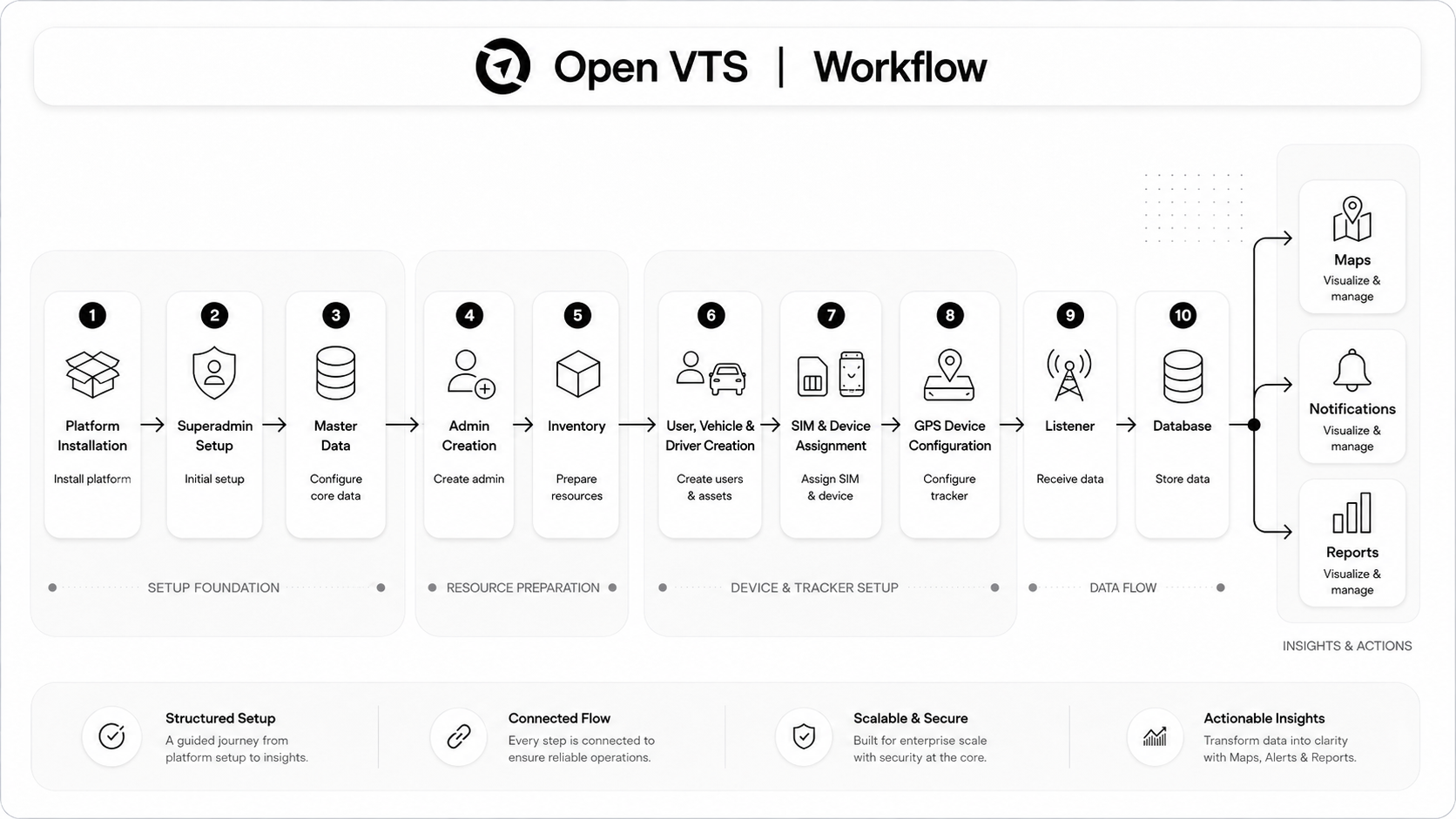
[Graphic Reference: Add a complete Open VTS workflow graphic here. Show Platform Installation → Superadmin Setup → Master Data → Admin Creation → Inventory → User, Vehicle and Driver Creation → SIM and Device Assignment → GPS Device Configuration → Listener → Database → Maps, Notifications and Reports. Use a left-to-right enterprise workflow with short labels and no long paragraphs.]
Who Can See What?
| Information or action | Superadmin | Admin | User |
|---|---|---|---|
| Complete platform | Yes | No | No |
| All Administrator | Yes | No | No |
| Admin business operation | Platform oversite | Yes | No |
| User under an admin | Support visibility where permitted | Yes | No |
| Platform-wide vehicles | Yes | No | No |
| Admin-managed vehicle | Oversight | Yes | Assigned only |
| Device and Sim inventory | Oversight | Yes | No |
| Live tracking | Platform-wide | Managed Vehicles | Assigned Vehicles |
| Master Data | Yes | Uses available Options | No |
| Server and SSL | Yes | No | No |
| Plans and billing | Platform level | Business level | Own accounts view |
| Platform settings | Yes | Limited business settings | Personal settings |
| Support | Platform escalation | Customer support | Create and view own tickets |
| Reports | Platform oversight where available | Managed-fleet reports where permitted | Reports for assigned vehicles |
The exact permissions may vary according to configuration and assigned access.
The Most Important Concept
Open VTS is not a collection of unrelated menus.
Every module exists to support one of four responsibilities:
1. Platform Control
Handled mainly by the Superadmin:
- Server
- SSL
- Master Data
- Platform Settings
- Administrators
- License
2. Business Operations
Handled mainly by the Admin:
- Users
- Vehicles
- Drivers
- Team
- Inventory
- Plans
- Payments
- Support
3. Fleet Operations
Used mainly by Admins and Users:
- Maps
- Landmarks
- Routes
- Notifications
- Reports
- Vehicle history
- Sensors
- Events
- Reports
4. Accountability and Continuity
Shared across the platform:
- Logs
- Transactions
- Payments
- Calendar
- Support
- Notifications
- Server monitoring
Together, these areas turn raw GPS data into a complete tracking business and fleet-management operation.
What This Page Does Not Explain
This page explains:
- Why each role exists
- Why each module exists
- How the modules relate
- What must happen before tracking works
- Which role is responsible for each area
It does not explain every button or field.
The step-by-step instructions are provided in the respective guides:
- Superadmin Guide
- Admin Guide
- User Guide
- Devices and Protocols
Next Step
Continue to Superadmin Panel Tour to begin configuring the platform owner workspace.