
What Is Open VTS?
Learn what Open VTS is, how its self-hosted vehicle tracking model works, who it is built for, and what businesses can manage through the platform.
Last updated July 15, 2026
What Is Open VTS?
Open VTS is a self-hosted vehicle tracking software built for businesses that want greater control, ownership, and security over their tracking infrastructure.
It enables a business to deploy GPS tracking software on its own server, connect compatible GPS devices, track vehicles in real time, manage fleet operations, create customer accounts, configure alerts, review historical activity, and operate the platform under its own business identity.
Unlike a conventional software-as-a-service platform, Open VTS is designed to run within infrastructure controlled by the business using it. This reduces dependence on a locked third-party tracking platform and gives the operator more control over deployment, configuration, data access, and long-term operations.
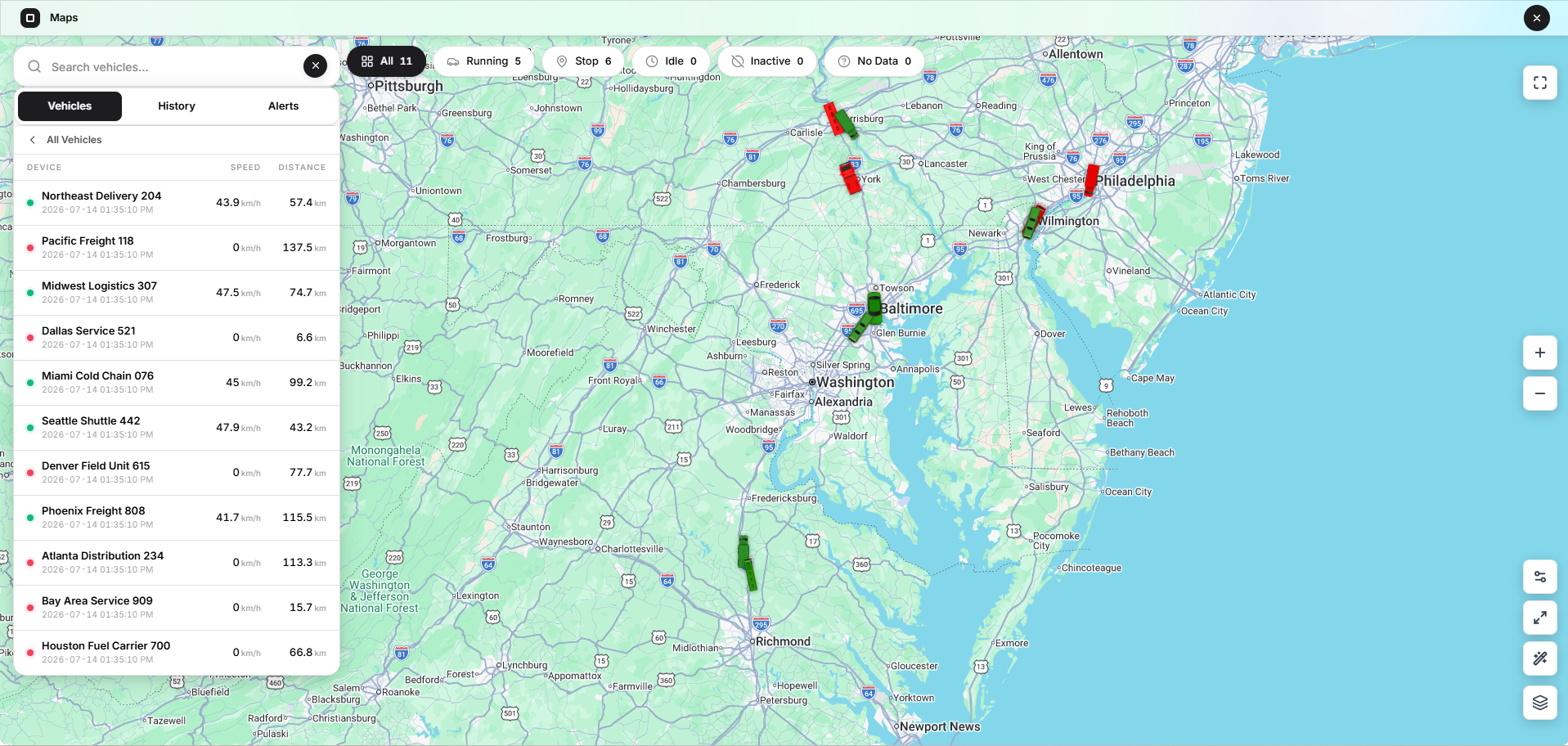
Open VTS in Simple Terms
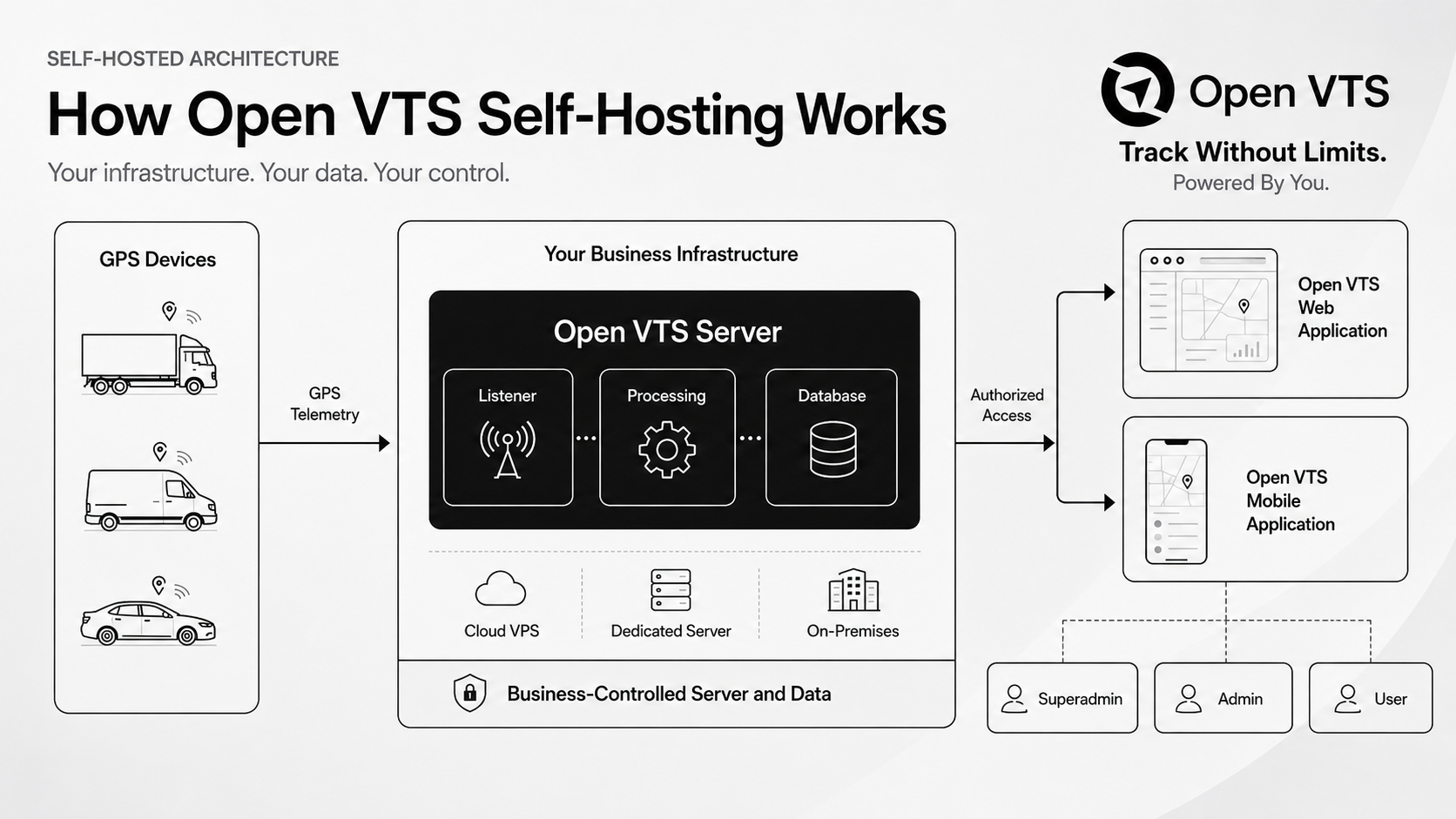
A GPS tracking system usually contains several separate parts:
- GPS devices installed in vehicles
- A server that receives data
- Software that processes and stores the infomation
- A web or mobile application used to view and manage vehicles
Open VTS brings these parts together into one vehicle tracking platform.
A GPS device sends information such as location, speed, direction, ignition status, and sensor data to the Open VTS server. Open VTS processes that information and makes it available to authorized Superadmins, Admins, Users, drivers, and operational teams.
The platform is designed to help businesses move from receiving raw GPS data to operating a complete tracking service.
What Does Self-Hosted Mean?
Self-hosted means Open VTS is deployed on a server controlled by your business rather than being available only through another company’s shared SaaS platform.
Depending on your deployment, the server may be:
- A cloud server
- A virtual private server
- A dedicated server
- A private data-centre server
- An on-premises business server
Your organization is responsible for selecting and maintaining the server environment, while Open VTS provides the software layer used to receive, process, manage, and display vehicle tracking data.
Self-hosting can provide greater infrastructure control, but it also creates operational responsibilities. The server owner must maintain appropriate backups, operating-system updates, access controls, firewall rules, SSL certificates, storage capacity, and security practices.
What Can Open VTS Help You Manage?
Open VTS is designed to support the core operational needs of a vehicle tracking business or fleet operation.
Live Vehicle Tracking
View the latest available location, movement status, speed, ignition information, and other telemetry received from connected GPS devices.
Vehicle Management
Create and manage vehicle records, connect GPS devices, assign SIM cards, configure vehicle information, and organize vehicle access.
Customer and User Management
Create administrators, business customers, fleet users, drivers, team members, and subusers with role-appropriate access.
Maps and Vehicle History
View vehicles on a map, review historical movement, inspect routes, identify stops, and use route playback where available.
Alerts and Notifications
Configure operational notifications such as overspeed, idle duration, overstay, geofence entry or exit, route deviation, and other supported events.
Reports
Generate reports using vehicle activity and telemetry data, including distance, trips, running and stoppage activity, overspeed events, geofence activity, sensors, and notifications.
Device and SIM Inventory
Manage GPS devices and SIM cards before assigning them to vehicles or customer accounts.
Commands and Device Configuration
Send supported commands to compatible GPS devices and review command activity.
White-Label Configuration
Configure business branding and customer-facing settings where supported by the installed Open VTS edition and configuration.
Payments, Credits, and Renewals
Manage applicable plans, vehicle renewals, administrator credits, customer transactions, and payment records.
Support and Activity Logs
Manage support requests and review operational activity across the platform.
Who Is Open VTS Built For?
Open VTS is primarily designed for businesses that want to operate or control their own GPS tracking environment.
Typical users include:
GPS Tracking Companies
Businesses that provide vehicle tracking services to their own customers and need control over branding, administrators, users, vehicles, devices, and service operations.
Fleet Owners
Companies managing commercial vehicles, delivery fleets, rental fleets, logistics operations, school transport, employee transport, waste collection, service vehicles, or other mobile assets.
Telematics Providers
Organizations integrating GPS devices, sensors, vehicle data, commands, alerts, and reporting into a managed tracking solution.
Installation and Support Teams
Technical teams responsible for server deployment, GPS device configuration, protocol setup, troubleshooting, and customer support.
Businesses Moving Away From Locked SaaS Platforms
Organizations that want to reduce dependence on per-vehicle SaaS systems and gain more control over their infrastructure and tracking data.
How Open VTS Is Structured
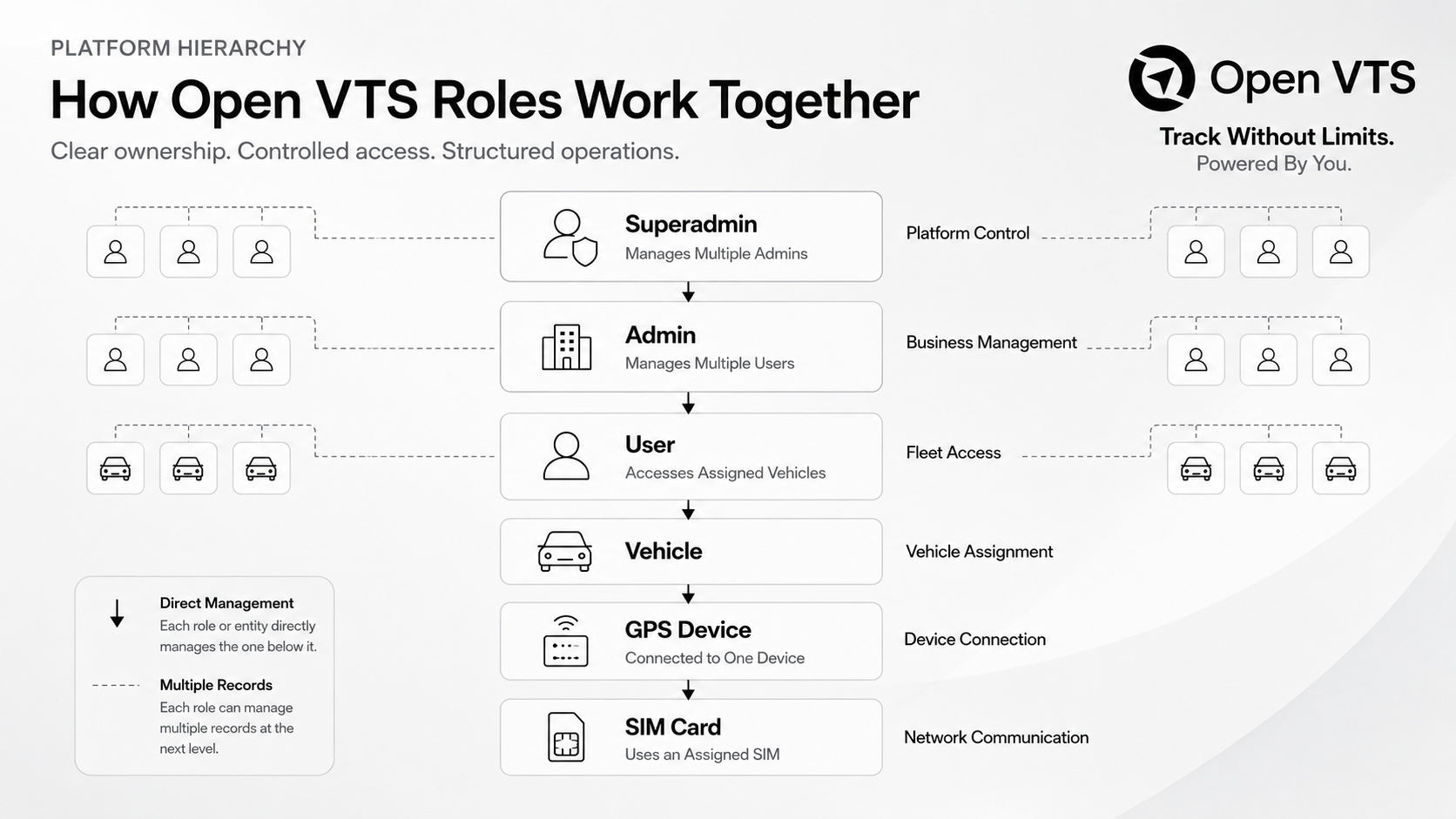
Open VTS uses a role-based hierarchy so each person sees and manages the correct part of the platform.
Superadmin
The Superadmin manages the entire Open VTS platform.
Typical responsibilities include:
- Platform configuration
- Administrator management
- Master data
- Global vehicle visibility
- Server monitoring
- License management
- Payments
- Notifications
- Support
Admin
An Admin normally manages one GPS tracking business, branch, reseller operation, or customer group under the Superadmin.
Typical responsibilities include:
- Creating users
- Adding vehicles
- Managing drivers
- Managing teams
- Managing GPS devices and SIM inventory
- Assigning vehicles
- Managing plans and renewals
- Handling support and notifications
User
A User is generally the fleet customer or vehicle owner who tracks and manages vehicles assigned to their account.
Typical capabilities may include:
- Live tracking
- Vehicle history
- Maps
- Reports
- Geofences
- Points of interest
- Routes
- Notifications
- Drivers
- Subusers
- Support
The exact permissions available to each role depend on the platform configuration and the access assigned by the responsible administrator.
How GPS Data Reaches Open VTS
The basic data flow works like this:
- A compatible GPS device is installed or placed in a vehicle.
- The device determines its location and collects supported vehicle or sensor information.
- The device sends data to the configured Open VTS server IP address and protocol port.
- The Open VTS listener receives and decodes the device message.
- The platform processes and stores the supported telemetry.
- Authorized users see the latest vehicle status through the web or mobile application.
- Open VTS uses the received data for maps, history, events, notifications, and reports.
The data available in Open VTS depends on the GPS device, protocol, configuration, signal availability, connected sensors, and the information transmitted by the device.
What Makes Open VTS Different?
Open VTS is positioned around infrastructure ownership rather than access to another company’s hosted dashboard.
Its primary differences include:
Deployment Control
The business chooses where Open VTS is installed and how the server environment is managed.
Data Control
Tracking information is stored within the selected Open VTS deployment instead of being available only through a shared external SaaS account.
Business Control
The platform can support administrators, users, vehicles, devices, branding, plans, payments, and operational workflows under one business structure.
Reduced Platform Dependency
The organization is not required to build a complete GPS tracking platform from the beginning or depend entirely on a locked tracking provider.
Easier Deployment
Open VTS is designed to simplify the process of deploying a self-hosted vehicle tracking environment, including guided installation and first-time setup.
Open VTS Is More Than a Live Map
A live map is only one part of a vehicle tracking operation.
A complete GPS tracking business may also need to manage:
- Customer accounts
- User permissions
- Vehicle assignments
- GPS device inventory
- SIM card inventory
- Driver records
- Notifications
- Reports
- Renewals
- Payments
- Support requests
- Server health
- Device protocols
- Historical telemetry
- Video Telematry
Open VTS brings these operational areas into one platform so businesses can manage both vehicle tracking and the administration behind it.
Important Responsibility of a Self-Hosted Operator
Open VTS gives the organization more control, but the organization must use that control responsibly.
A self-hosted operator should establish processes for:
- Server security
- Strong passwords
- Restricted administrative access
- Firewall configuration
- SSL certificates
- Operating-system updates
- Database protection
- Regular backups
- Backup testing
- Monitoring
- Storage planning
- Software upgrades
- Protection of API keys and integration credentials
Self-hosting should not be understood as automatic security. Security depends on how the server, network, accounts, credentials, backups, and software are managed.
What You Will Learn in This Documentation
The Open VTS documentation will guide you through the complete platform journey:
- Understand the Open VTS platform
- Prepare a server
- Install Open VTS
- Complete first registration
- Understand platform roles and hierarchy
- Configure the Superadmin environment
- Create administrators and users
- Add vehicles, devices, and SIM cards
- Connect GPS devices
- Track vehicles
- Configure notifications
- Generate reports
- Manage operations and support
The documentation is organized by role and workflow so you can follow the path most relevant to your responsibilities. This structure reflects the intended journey from platform understanding through installation and daily operation.
Frequently Asked Questions
Is Open VTS a GPS device?
No. Open VTS is the software platform that receives and manages information sent by compatible GPS tracking devices.
Does Open VTS provide vehicle location without a GPS device?
A supported location source is required. In most deployments, a GPS tracking device installed in the vehicle sends location and telemetry data to Open VTS.
Is Open VTS a SaaS platform?
Open VTS is primarily designed as self-hosted vehicle tracking software. It is deployed on infrastructure selected and controlled by the operating business.
Can Open VTS manage multiple customers?
Yes. Its hierarchy is designed to support Superadmins, Admins, Users, vehicles, drivers, devices, SIM cards, and other operational records.
Does every GPS device work automatically?
No. A device must use a supported protocol and be configured with the correct server address, port, APN, identifier, and reporting settings.
Is technical knowledge required?
Open VTS aims to simplify deployment and operation, but server management, network configuration, device protocols, security, backups, and troubleshooting may require technical knowledge.
Next Step
Continue to Open VTS Platform Overview to understand the major areas of the platform and how its modules work together.
After that, read What Is Self-Hosted Vehicle Tracking? for a deeper explanation of infrastructure ownership, data control, and the responsibilities involved in operating a self-hosted platform.