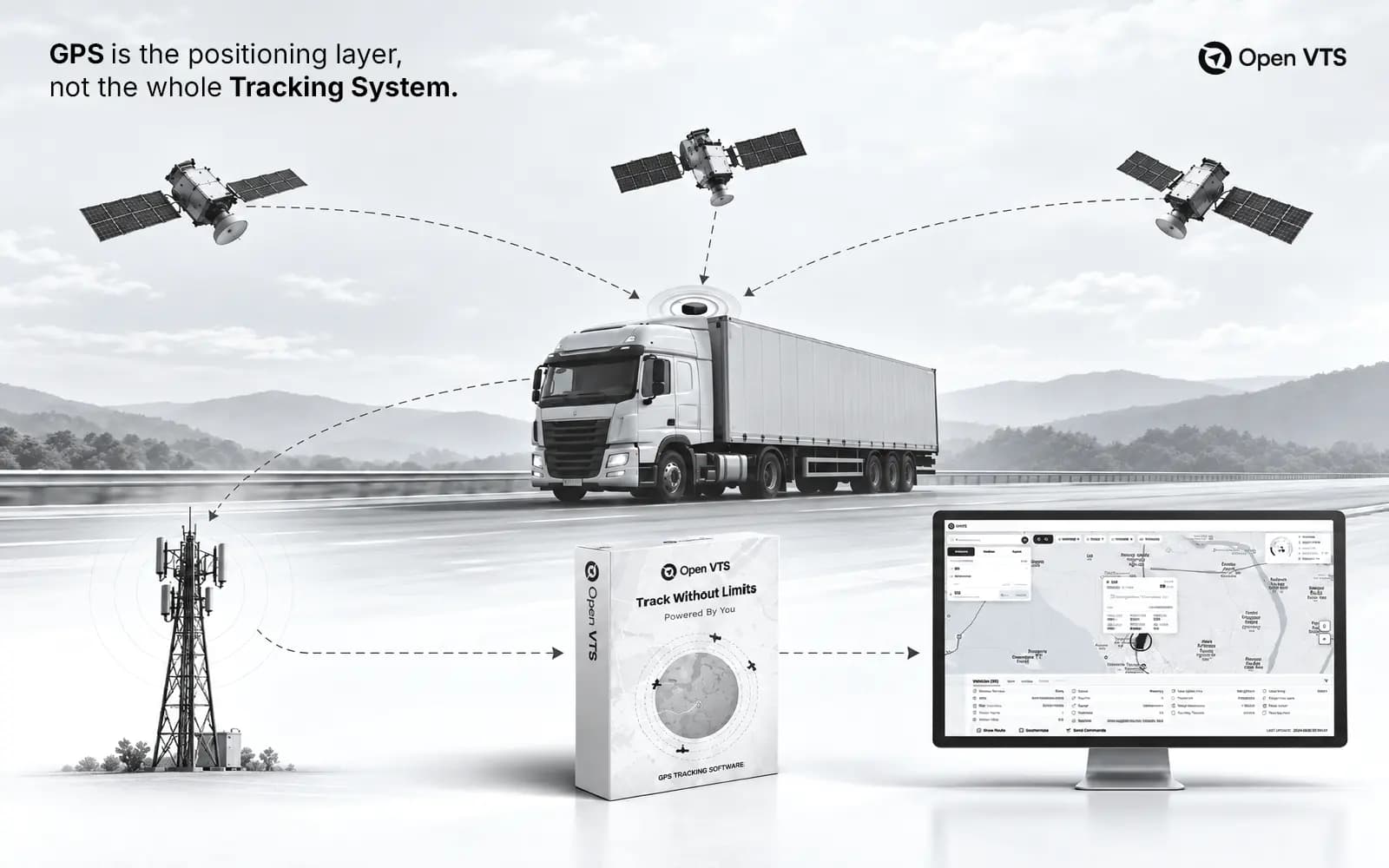

What is GPS tracking software & how it works? Simple answer: it is the system that shows where your vehicles, drivers, or assets are in real time.
But that is only the surface.
A modern GPS tracking platform does more than show dots on a map. It collects vehicle data, stores route history, sends alerts, tracks stoppages, monitors driver behavior, and helps businesses make faster decisions.
GPS tracking software works by receiving location data from a GPS device installed in a vehicle. The device gets its position from satellites, sends the data through a mobile network to a server, and the software turns that data into live maps, reports, alerts, and insights.
In 2026, the bigger question is not only, “Where is my vehicle?”
The real question is:
Who controls the tracking data, the server, the platform, and the future of your fleet system?
That is where OpenVTS brings a different angle.
Most GPS platforms give you tracking. OpenVTS is built for tracking with ownership.
What Is GPS Tracking Software?
GPS tracking software is a digital platform used to monitor vehicles, drivers, machines, or assets using GPS location data. A GPS device is installed in the vehicle. That device collects location, speed, time, direction, and other useful data. Then the software displays that data on a dashboard.
You can see:
- Where a vehicle is now.
- Where it traveled earlier.
- How fast it moved.
- Where it stopped.
- When ignition was on or off.
- Which routes were used.
- Which alerts were triggered.
- How drivers behaved.
Think of it as the control room for your fleet. Without the software, a GPS tracker is just a small hardware device. With the software, that device becomes useful business intelligence.
The fleet management software market was valued at USD 32.36 billion in 2025 and is projected to reach USD 38.28 billion in 2026, according to Fortune Business Insights. That shows how fast businesses are moving from manual fleet control to software-driven operations.
GPS Tracker vs GPS Tracking Software
A GPS tracker is the physical device. It is installed in a car, truck, bus, bike, machine, or asset. A GPS tracking software platform is the system that receives and shows the data.
GPS Tracking Software vs Navigation Apps
- Google Maps helps a driver reach a destination.
- GPS tracking software helps a business monitor and manage many vehicles.
- Navigation apps are made for the person inside the vehicle.
GPS tracking software is made for the business that owns or manages the vehicle.
A navigation app answers:
“Which road should I take?”
GPS tracking software answers:
“Where are all my vehicles, what are they doing, and how can I improve operations?”
That difference matters.
A delivery company does not only need directions. It needs proof of movement, trip history, alerts, driver accountability, customer ETAs, and reports. A school transport business does not only need maps. It needs safety, route control, parent updates, speed alerts, and stoppage records. A logistics company does not only need location. It needs control.
How GPS Tracking Software Works
GPS tracking software works through a chain of connected parts.
The full flow looks like this:
Vehicle → GPS device → satellite signal → mobile network → server → database → dashboard → reports and alerts
Each part has a role.
If one part is weak, the full system suffers.
Step 1: The GPS Device Finds Its Location
GPS stands for Global Positioning System. It is a satellite-based system that provides positioning, navigation, and timing services. GPS.gov describes GPS as a U.S.-owned utility that supports many modern applications across daily life and business.
The device calculates its location using satellite signals.
It usually collects:
- Latitude
- Longitude
- Speed
- Time
- Direction
- Altitude
- Ignition status
- Battery status
- Device status
- Sensor data, if connected
The device does not need to “see” the map. It only needs to calculate where it is. The software later places that location on the map.
Step 2: The Device Sends Data to a Server
After the GPS device collects data, it sends that data to a server. Most devices use a SIM card and mobile network. This may include:
- 2G
- GPRS
- 4G
- LTE
- NB-IoT
- Satellite network, in special cases
The device sends small data packets. These packets contain location and vehicle information.
A basic packet may say:
“This vehicle is at this latitude and longitude. It is moving at 48 km/h. Ignition is on. The time is 10:32 AM.”
That data reaches the GPS tracking server. This is where the real software work begins.
Step 3: The Server Receives and Processes Data
The server receives raw GPS data from the device. Then it processes it. This may sound technical, but the idea is simple.
The server checks:
- Which device sent this data?
- Which vehicle belongs to this device?
- Is the packet valid?
- What is the location?
- Is the vehicle moving or stopped?
- Is ignition on or off?
- Has it entered a geofence?
- Has it crossed the speed limit?
- Should an alert be created?
This is one of the most important parts of GPS tracking software. Many basic articles only talk about satellites and maps. But in real business use, the server is the heart of the system. If the server fails, the dashboard becomes useless. If the server drops data, route history becomes incomplete. If the system cannot handle delayed packets, reports become inaccurate. hat is why enterprise GPS software needs strong backend architecture.
Step 4: The Data Is Stored in a Database
After processing, the data is saved. This creates history.
History is what lets you answer questions like:
- Where was the vehicle yesterday?
- How many kilometers did it travel?
- How long was the engine on?
- Where did the driver stop?
- Was there any overspeeding?
- Did the vehicle enter a restricted area?
- Was the route followed correctly?
Real-time tracking is useful. But historical data is often more valuable. It helps you find patterns. It helps you prove what happened. It also helps you improve the business.
From my experience, many fleet owners first buy GPS tracking for live location. But after a few months, they care more about reports. Reports show fuel waste, driver behavior, vehicle usage, idle time, and route discipline.
That is where money is saved.
Step 5: The Dashboard Shows Everything
The dashboard turns raw data into a human-friendly view.
A good GPS tracking dashboard shows:
- Live map
- Vehicle list
- Moving vehicles
- Stopped vehicles
- Idle vehicles
- Offline vehicles
- Route playback
- Geofence alerts
- Speed alerts
- Stoppage reports
- Driver reports
- Maintenance reminders
- Shareable tracking links
- Admin controls
The best dashboards are simple. A fleet manager should not fight with the software. They should open the dashboard and understand the fleet in seconds. Big cards, messy layouts, and too many colors create stress. A serious fleet dashboard should feel calm, clear, and fast. This matters more than many people think. Software design affects daily decision-making.
Key Features of GPS Tracking Software
- The best GPS tracking software is not judged by one feature.
- It is judged by how well all features work together.
- A beautiful map is not enough.
- You need accuracy, history, alerts, reports, control, and reliability.
Real-Time Vehicle Tracking
Real-time tracking shows the current location of each vehicle. This helps fleet managers know what is happening now.
They can check:
- Which vehicle is nearest to a customer.
- Which vehicle is delayed.
- Which vehicle is off route.
- Which vehicle is stopped too long.
- Which vehicle is offline.
Real-time tracking is useful for logistics, school buses, taxis, construction, emergency services, and field teams. But real-time data must be accurate. If updates are too slow, the map becomes misleading. If the software cannot process data quickly, the fleet manager loses trust.
Route History and Playback
Route history shows where a vehicle traveled earlier. Playback lets you replay the trip on a map.
This is useful when you need to check:
- Exact path taken
- Start and end points
- Stop locations
- Speed changes
- Route violations
- Customer visit proof
- Driver disputes
- Delivery verification
Route playback is one of the most powerful features in GPS tracking software. It turns movement into proof. For businesses, proof matters. A customer may say the driver never came. A driver may say there was traffic. A manager may suspect route misuse. Route history helps settle these issues with data.
Geofencing Alerts
A geofence is a virtual boundary on the map.
You can create a geofence around:
- Warehouse
- Customer site
- School
- City zone
- Fuel station
- Parking yard
- Restricted area
- Delivery location
The software can send alerts when a vehicle enters or exits that area.
For example:
“Vehicle entered warehouse at 9:12 AM.”
Or:
“Vehicle left delivery zone at 4:40 PM.”
This is useful for security, delivery proof, route discipline, and automation.
Speed, Idle, and Stoppage Reports
Speed reports help reduce risk. Idle reports help reduce fuel waste. Stoppage reports help improve productivity.
These reports answer practical questions:
- Which driver often overspeeds?
- Which vehicle idles too long?
- Which stops are normal?
- Which stops look suspicious?
- Which routes waste time?
The commercial vehicle telematics market is projected to grow from USD 27.4 billion in 2025 to USD 92.3 billion by 2035, according to Future Market Insights. The report connects this growth to demand for operational efficiency, fuel optimization, and compliance.
That is the real reason GPS software is growing. Businesses are not buying maps. They are buying control over cost, time, safety, and service quality.
Maintenance and Vehicle Health
Modern GPS tracking software can also help with maintenance.
It can track:
- Odometer
- Engine hours
- Service due dates
- Battery status
- Diagnostic data
- Harsh driving behavior
- Vehicle usage
This helps businesses avoid breakdowns. A vehicle breakdown does not only cost repair money.
It delays deliveries. It hurts customers. It damages trust. Good tracking software helps prevent these problems before they become expensive.
Alerts and Notifications
Alerts are the action layer of GPS tracking software.
Common alerts include:
- Overspeed alert
- Ignition on/off alert
- Geofence entry/exit alert
- Power cut alert
- SOS alert
- Tow alert
- Long stoppage alert
- Route deviation alert
- Device offline alert
- Maintenance alert
Alerts can be shown inside the dashboard. They may also be sent by email, mobile push, WhatsApp, SMS, or webhook. A strong system should let businesses choose what matters. Too many alerts create noise. The right alerts create control.
Why GPS Tracking Software Matters for Businesses in 2026
GPS tracking software used to be a “nice to have.” That has changed. Today, fleet operations are more complex. Fuel is expensive. Customers expect faster updates. Drivers need accountability. Assets need protection. Businesses want lower costs and better control.
GPS tracking software is no longer just a “nice-to-have” tool for businesses. In 2026, it has become essential for managing modern fleet operations efficiently. Rising fuel costs, growing customer expectations, and increasing operational complexity make real-time tracking more important than ever.
Businesses today need better control over drivers, vehicles, and assets. Customers expect faster updates and accurate delivery timelines, while companies want to reduce costs, improve productivity, and protect their assets from misuse or theft.
Fleet Visibility Is Now a Business Advantage
You cannot improve what you cannot see. That’s why fleet visibility has become a major business advantage in 2026.
GPS tracking software gives businesses real-time visibility into vehicles, drivers, and assets — helping teams make faster and smarter decisions every day.
For example:
- Dispatchers can assign the nearest available vehicle
- Managers can identify unauthorized vehicle usage
- Business owners can track underutilized vehicles
- Schools can monitor bus routes and student safety
- Logistics companies can share accurate ETAs with customers
- Construction companies can protect expensive equipment and machinery
This is why GPS tracking is no longer limited to security purposes alone. It has become an essential part of daily operations, efficiency, and cost control.
The fleet telematics market is projected to grow from USD 10.42 billion in 2025 to USD 21.95 billion by 2032, according to MarketsandMarkets — showing how businesses are increasingly investing in smarter, data-driven fleet operations.
AI Is Entering Fleet Management
GPS tracking software is also becoming smarter with AI-powered features.
Modern fleet platforms are starting to use AI for fuel insights, driver behavior analysis, maintenance suggestions, and automated reports. Instead of just collecting data, these systems help businesses understand what the data actually means.
For example, Ford recently introduced AI capabilities for its commercial fleet platform to help managers analyze vehicle speed, seat belt usage, diagnostics, and other fleet data more efficiently. The goal is simple — reduce manual work, improve decision-making, and save time.
GPS Tracking Is About Trust
The biggest value of GPS tracking software is not just location tracking — it is trust.
Businesses trust the data.
Managers trust the reports.
Customers trust the delivery updates.
Drivers trust fair and accurate monitoring.
And companies trust their day-to-day operations.
When tracking data is reliable, teams work with better clarity, faster decisions, and fewer misunderstandings. But when data is incomplete, inaccurate, or locked inside a vendor’s system, that trust starts to break down.
That is why businesses in 2026 should look beyond basic features and ask more important questions:
- Who owns the tracking data?
- Can the data be exported easily?
- Can the software be self-hosted?
- Does it integrate with existing business systems?
- Can it work with preferred GPS devices?
- Will it scale without losing flexibility or control?
These questions are becoming more important than ever as fleet operations continue to grow smarter and more data-driven.
SaaS vs Self-Hosted GPS Tracking Software
Most GPS tracking software pages only explain the basic system:
Device → Satellite → Network → Dashboard
That explanation is useful — but it is not enough.
Businesses also need to understand where the tracking platform actually runs and who controls the data.
Today, there are two common deployment models:
- SaaS GPS tracking software
- Self-hosted GPS tracking software
Both options can work well, but they offer very different levels of flexibility, control, customization, and data ownership.
What Is SaaS GPS Tracking Software?
SaaS (Software as a Service) GPS tracking software is hosted and managed by the vendor. Businesses access the platform through a web browser or mobile app, while the provider handles the server, database, updates, and infrastructure.
This model is popular because it is simple to set up and easy to use. Most SaaS platforms charge a monthly or yearly subscription, usually based on the number of vehicles.
For example:
- $3 per vehicle per month
- $5 per vehicle per month
- $10 per vehicle per month
SaaS works well for many small and growing fleets because it requires minimal technical setup.
However, over time, businesses may face certain limitations. In most cases, the vendor controls important parts of the system, including:
- Database access
- Server infrastructure
- Data retention policies
- Custom feature development
- White labeling and branding
- Internal integrations
- Device protocol support
- Long-term scaling costs
For smaller operations, SaaS can be a practical choice. But for larger or more complex fleet businesses, these limitations can become difficult to manage.
What Is Self-Hosted GPS Tracking Software?
Self-hosted GPS tracking software runs on your own infrastructure instead of the vendor’s servers.
The platform can be deployed on your office server, private data center, or cloud account — giving your business full control over the system, data, and operations.
With a self-hosted setup, you control:
- The server infrastructure
- Fleet data and storage
- Platform access and security
- Custom integrations and features
- System rules and configurations
This approach is designed for businesses that want greater flexibility, privacy, and long-term control.
For example, OpenVTS is built around the self-hosted model. The platform focuses on giving businesses full ownership of their fleet tracking environment without vendor lock-in or shared infrastructure.
With self-hosted GPS tracking, businesses are not just using the software — they own and control the entire operating layer behind it.
Why OpenVTS Takes the Ownership Route
OpenVTS is not positioned as just another GPS tracking platform. Its core idea is simple:
Your vehicles. Your server. Your data. Your rules.
This approach matters for businesses that want more than basic tracking. It is especially valuable for:
- Companies managing growing fleets
- GPS tracking service providers
- Businesses building their own tracking platform
- Teams looking to avoid endless per-vehicle software fees
Most traditional GPS tracking platforms follow a SaaS model that says:
“Use our system.”
OpenVTS takes a different approach:
“Own your system.”
That difference gives businesses more control, flexibility, and independence as their operations scale.
How to Choose the Right GPS Tracking Software
Choosing GPS tracking software is not only a technical decision. It is a business decision. The wrong software can trap your data, limit your growth, and increase your cost. The right software can become a long-term operating system for your fleet.
Check Device Compatibility
Do not choose software before checking device support. Some platforms only work with their own GPS hardware.That creates lock-in. A flexible platform should support many device types and protocols. This matters when you already have devices installed. It also matters when you want to buy hardware from different suppliers. Hardware freedom gives you pricing power. It also protects your business from vendor dependency.
Check Real-Time Performance
A tracking platform must update fast.
Slow tracking creates confusion.
Ask:
- How often does the map update?
- How many devices can it handle?
- What happens during peak load?
- Does it support history packets?
- Does it store delayed data correctly?
- Does route playback stay accurate?
A cheap system may look fine with 10 vehicles.
It may fail with 500.
If you are building for scale, test for scale.
Check Reports and Alerts
Reports should be simple. Alerts should be useful. Do not get impressed by a long feature list. Ask what the software helps you decide.
Good GPS reports should answer:
- Which vehicles are underused?
- Which drivers waste fuel?
- Which routes are inefficient?
- Which vehicles need service?
- Which trips were delayed?
- Which alerts need action?
Reports should not feel like raw data dumps.
They should help managers act.
Check Data Ownership
This is one of the most ignored points.
Before choosing any platform, ask:
- Can I export my data?
- Where is my data stored?
- Who has access to it?
- Can I host the system myself?
- Can I define retention rules?
- Can I connect the data to my own tools?
- What happens if I leave the vendor?
Many businesses ask these questions too late. They realize the problem only after years of data is locked inside a system. In 2026, data ownership is not a luxury. It is part of business control.
Check API and Integration Options
Modern fleet software should connect with other tools.
This may include:
- ERP
- CRM
- Dispatch system
- Billing system
- Maintenance software
- Customer portal
- Mobile app
- WhatsApp alerts
- Accounting software
- Business intelligence tools
A GPS tracking platform should not be an island. It should connect to your workflow. That is where APIs matter. Without APIs, your team may keep copying data manually. That wastes time and creates mistakes.
Check User Experience
Good design is not decoration. It affects speed. Fleet managers work under pressure. They do not want confusing menus and oversized cards. They want clear maps, clean lists, fast filters, and useful alerts. A strong GPS platform should feel:
- Fast
- Calm
- Clear
- Consistent
- Mobile-friendly
- Easy to train
The best software does not make users feel small. It makes them feel in control.
The Future of GPS Tracking Software: From Location to Ownership
GPS tracking software started with a simple promise:“See your vehicle on a map.” That promise is no longer enough.
In 2026, the winning platforms will go further. They will help businesses control data, automate decisions, reduce cost, improve safety, and connect fleet operations with the rest of the company.
From Tracking to Fleet Intelligence
The future is not only tracking. It is fleet intelligence. That means:
- Better route decisions
- Smarter maintenance
- Driver behavior insights
- Fuel waste detection
- Risk scoring
- Customer ETA automation
- AI-assisted summaries
- Connected vehicle data
- Open integrations
But intelligence needs ownership. If your data is locked, your intelligence is limited. If your system is closed, your automation is limited. If your platform is controlled by someone else, your flexibility is limited. This is why self-hosted GPS tracking has a strong future. It gives companies a way to build on their own foundation.
The OpenVTS View
OpenVTS is designed for businesses that want more than live tracking. It is for companies that want control over the platform itself. That includes:
- Self-hosting
- Data ownership
- Vehicle tracking
- Route history
- Alerts
- Reports
- API access
- Branding freedom
- Infrastructure control
- No shared tenancy
- No vendor lock-in
This is not only a technical difference. It is a positioning difference. The market is full of GPS platforms that rent access. OpenVTS is built around ownership. That is the message.
Not louder.
Sharper.
Final Thoughts
GPS tracking software is the system that turns vehicle movement into useful business data. It works by collecting GPS data from a device, sending it to a server, storing it in a database, and displaying it through maps, alerts, reports, and dashboards. But modern tracking is no longer only about location.
It is about control. A business should know where its vehicles are. It should also know where its data lives. That is the bigger shift. Traditional GPS software helps you track vehicles. OpenVTS helps you own the tracking platform behind them. That difference matters in 2026. Because the future of fleet management will not belong to companies that only see their vehicles. It will belong to companies that control their fleet intelligence.