
Locate distributed assets
See cars at branches, customer locations or the last reported place on their journeys, together with reporting freshness.
VEHICLE RENTAL & LEASING
Know where rental cars, vans and leased vehicles last reported. Review journeys, monitor key locations and investigate mileage or return exceptions—all through self-hosted GPS tracking software that your business controls.
Built for rental operators, corporate leasing teams, fleet service providers and businesses managing vehicles across locations.

FROM VEHICLE LOCATION TO FLEET DECISIONS
Short-term rentals and multi-year leases put your vehicles in different places, under different customers and contractual terms. Operators need to distinguish what is known from a GPS device from what is established by the rental or leasing management system.
Open VTS provides the tracking layer: latest reported locations, journey history, configurable geofences, alerts, reports and APIs. Connect that evidence to bookings, inspections, payments and contracts through the appropriate operational process or integration.
Explore Vehicle Tracking SoftwareSee cars at branches, customer locations or the last reported place on their journeys, together with reporting freshness.
Compare trip history, stops, distance and supported sensor data when a return, servicing or lease review needs context.
Feed relevant tracking events into your booking, CRM, leasing or maintenance environment through documented APIs.
LIVE VEHICLE TRACKING FOR RENTAL & LEASING FLEETS
Select a sample branch or leasing portfolio. Inspect vehicle locations, movement state and last-update freshness. Rental status and contract context shown here are fictional examples from a connected booking system—not native GPS-derived booking states.
Last reported close to the return lane. This alone does not confirm the vehicle was handed back.
Use assigned vehicle groups and geofences to organize relevant locations such as branches, depots, servicing yards and return areas.
Device reporting intervals, connectivity, power and installation quality affect how recent a position is. A last-known point is not continuous real-time knowledge.
Review distance and route history. Use a supported vehicle odometer source when the contract requires precise mileage reconciliation.
RENTAL FLEET WORKFLOW
Follow a typical rental journey. Open VTS supplies vehicle location and event context; your rental-management and inspection systems establish contract, handover and return-completion records.
Verify the vehicle and service readiness in your rental system. Review the latest tracker report before handover.
Vehicle availability is established in the rental system, not inferred from location.
Contracts, driver verification, photographs, fuel readings and inspection signatures belong to your rental process. GPS adds the latest known vehicle context.
Geofence or movement alerts can flag unexpected journeys. Context matters: vehicle timestamp, agreed travel conditions, legitimate detours and customer privacy.
Compare location history and compatible odometer data with inspection, contract, fuel and billing records before resolving a customer dispute.
EXCEPTION-BASED RENTAL MONITORING
Rental and lease operators often need to understand a vehicle movement that falls outside a planned operating area, a late return window, or an expected reporting schedule. Start with an event, review its source, then make a proportionate operational decision.
Configurable Open VTS alerts and historical reports provide vehicle evidence. Authorized staff, customer contact procedures and contractual interpretation remain your organization's responsibility.
A rental vehicle reports movement after a configured window. Check device freshness and whether the movement is authorized before escalating.
This is an illustrative rule-to-review workflow. It does not identify theft, prove a contract breach or initiate physical intervention automatically.

WHEN THE VEHICLE RETURNS
Pair a vehicle's journey and final reported location with your return inspection, fuel check, odometer record, cleaning status and contract terms. Each record answers a different question.
For a customer dispute, review the reporting timeline and source quality—not only the last map pin.
Understand the evidenceFLEET RECORDS & RETURN VERIFICATION
What can each information source establish? Switch between GPS, odometer, inspection, and contract evidence to see how the pieces work together.
Open VTS can show the latest received position, route history, recorded stops and supported geofence events. GPS alone cannot prove that keys were returned, the customer signed off, or the vehicle was undamaged.
Calculated from received tracker positions. It can help with usage analysis but may differ from the dashboard odometer due to reporting gaps, GPS noise and calculation methods.
Some devices and integrations provide vehicle-origin mileage, fault codes or fuel. Validate model, firmware, protocol, installation and accuracy before contractual use.
Your rental or leasing system remains the source for renter identity, authorized use terms, damage photos, payment adjustments and signed return acceptance.
SEE THE ACTUAL OPEN VTS INTERFACE
Explore genuine reference screenshots from Open VTS. The interface supplies tracking, geofences, route tools and reports; it is not presented as a rental booking or electronic inspection platform.
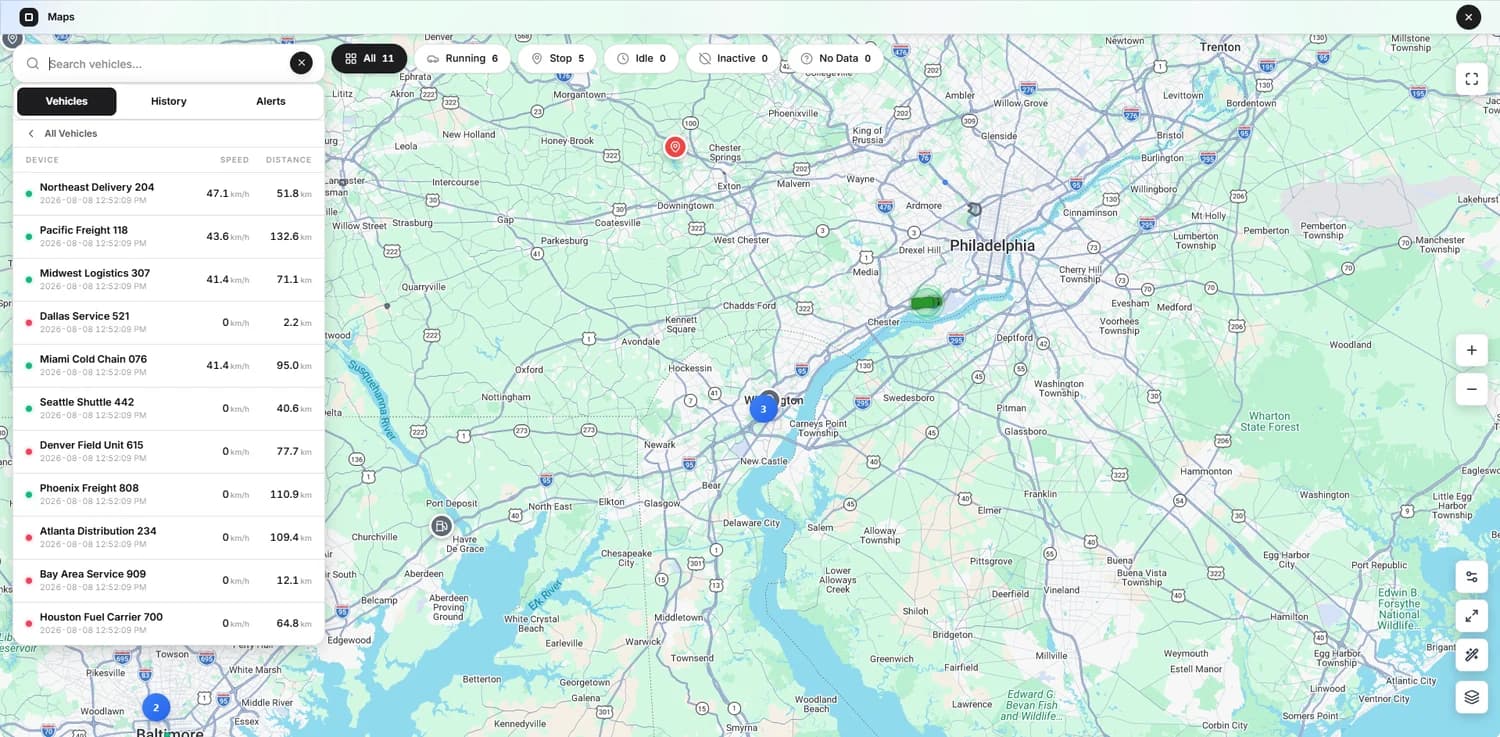
See fleet locations and supported status details on a shared map. For rental operations, connect customer, booking and return data through your own system where required.
LONG-TERM LEASING & FLEET LIFECYCLE
Leasing introduces a different rhythm from daily vehicle rental. The key questions are often mileage trends, vehicle location, out-of-policy use, servicing readiness and end-of-term reviews—not just today's booking status.
Open VTS supports the underlying GPS records and approved events. Your leasing system defines the contract allowances, service plan, financial values and end-of-term obligations.
Review GPS journey history and distance trends, then reconcile against an approved odometer source when enforcing contractual mileage limits.
Vehicle movement can highlight when to review an asset. Diagnostics, fault data, service completion, photographs and wear are separate approved data sources.
Define relevant geofences and alerts around locations or regions. Geographic presence does not by itself establish prohibited use or a contractual violation.
Use Open VTS roles, customers and vehicle assignments to control visibility across business units and service partners.
OWN THE TRACKING LAYER
Open VTS runs on customer-controlled infrastructure, giving rental companies and leasing operators control over how tracking data is stored, who can access it, and how it connects to business systems.
Keep the source of truth for commercial agreements in your rental platform. Use documented APIs to connect vehicle histories and events with the services that need them.
Operate Open VTS in a suitable hosted, private or on-premises environment and define backup, retention and access practices.
Integrate vehicle data into booking, leasing, CRM, ERP, operations and analytical workflows through authorized connections.
The Free software plan supports up to 50 vehicles. Hosting, trackers, SIM connectivity and optional third-party services remain separate costs.
Organize users and vehicle permissions. Apply additional purpose-limitation and privacy policies appropriate to customer-location data.
For an integrated rental operation, synchronize only approved identifiers and events. Define how booking status, renter contact, mileage readings, return inspections and retention policies are governed. Do not expose precise customer journeys beyond a legitimate and authorized purpose.
Architecture illustration · integrations require implementation
Use clear customer notices, lawful collection and sharing, appropriate role permissions and retention limits. Self-hosting changes your control over the system; it does not by itself satisfy local privacy laws or contractual obligations.
FROM ONE BRANCH TO A DISTRIBUTED FLEET
Validate the technology and operating process on a representative set of vehicles before extending it across a large portfolio.
Choose rental cars or vans with compatible devices. Verify installation, power, signal, mileage source, and any additional sensors.
Set up Open VTS, authorized accounts, branch vehicle groups, geofences, report access and data-retention rules.
Observe departure, a valid rental journey, return and mileage reconciliation using your actual agreements and inspection process.
Audit false alerts, signal gaps, privacy controls, contract integration, and support responsibilities before adding more branches.
QUESTIONS RENTAL OPERATORS ASK
Everything from rented-vehicle visibility to lease mileage, device limitations, privacy and integration with your commercial system.
Explore documentationIt is a platform that receives GPS device reports from vehicles used in rental operations and makes their latest location, history and supported events available to authorized staff. Open VTS is self-hosted GPS tracking software; contracts, reservations and invoicing generally remain in a separate rental management system.
Yes. Compatible devices can send vehicle positions to Open VTS, and authorized users can review the vehicles assigned to their accounts. Branch status and reservation availability are commercial records and need to be maintained or integrated separately.
When the GPS tracker is reporting and access is authorized, staff can view its latest location and history. The currentness of that position depends on device reporting and connectivity. Customer disclosure, legitimate use and location-data handling must be addressed in your rental terms and privacy practices.
No. A GPS record can show that a vehicle reported near the branch or return area. Key handover, agreement closure, condition acceptance and final return time need separate operational records.
Geofence, movement and timing rules can surface events worth reviewing, but a location alone cannot establish unauthorized activity or theft. Escalation depends on an authorized review of the agreement, timestamps, context and operating procedures. Recovery is not guaranteed.
Open VTS is a GPS tracking and fleet operations platform, not a dedicated rental-contract pricing or payment engine. A rental system can use appropriately integrated trip, time or mileage information under the operator's own commercial rules.
Open VTS can report GPS-based distance and any compatible vehicle odometer data received from installed hardware. Contractual mileage should be reconciled against a verified source, such as the dashboard odometer or supported OBD/CAN reading, rather than assumed to equal a GPS estimate.
It can provide movement and distance context. Comparing mileage against contractual allowances requires those allowances from a lease-management process and an appropriate odometer source. Any customer-facing decision should use approved data and review procedures.
Tracking and reporting can provide usage information to help a maintenance process. Engine faults, service schedules and maintenance task completion require suitable vehicle data or a connected maintenance management system where those functions are needed.
The interface can display the last report received. Some devices can store location records and upload them after connectivity returns, but that depends on model and configuration. Do not describe a stale position as a live location.
Yes. Open VTS supports configured geofence boundaries and relevant entry/exit notifications. Map accuracy, device reports and local contract terms should be reviewed before acting on a boundary event.
Fuel or engine diagnostic information depends on the device, sensors, vehicle interface, protocol and configuration. Basic GPS tracking alone does not provide accurate fuel levels or fault codes.
Not as a complete rental management suite. Use your existing rental, leasing, payment, inspection or claims systems for those workflows and connect approved GPS data using documented integration options.
Open VTS provides REST APIs and documented integration mechanisms for authorized development work. Your integration should define vehicle identifiers, booking states, privacy rules, reliable event transfer, data reconciliation and error handling.
Yes, if the installed hardware is supported. Basic location and history can be managed together; EV battery data, charging events and specialized vehicle readings require separate compatible data sources.
The Free software tier supports up to 50 vehicles without a software trial period. Costs for hosting, GPS trackers, SIM plans, maintenance and optional external services are separate.
You operate the Open VTS environment on infrastructure you control. Your organization still needs appropriate security, access permissions, backups, retention, customer notices and compliance with applicable law. Hosting control is not a substitute for privacy compliance.
Open VTS includes branding and customer account capabilities where supported by edition and deployment. Specific white-label app or domain changes should be confirmed against the chosen offering; platform source-code rights are not automatically included.
A BETTER VIEW OF THE FLEET YOU OPERATE
Start with a representative branch, verify the device and reporting behavior, and connect the records you need. Open VTS gives you a self-hosted tracking foundation for rental and leasing operations.